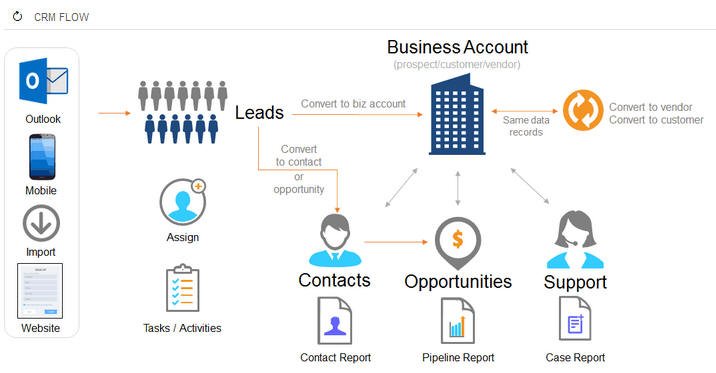
We live in a new era where companies need to be flexible, well-connected, and agile to accomplish ultimate success. You can manage and monitor business processes and customer relations with the Acumatica cloud ERP system with its cross-module workflow capabilities. The advanced Workflow Editor delivered in Acumatica 2020R1 can perform all tasks with new customisations in the workflow editor. Organisations don’t need to rely on tedious, scattered spreadsheets, and manual status transitions anymore. With all-new Acumatica 2020R1, you can handle workflow as per precise business rules to transition the document from one position to another. You can simply modify the status of actions, place actions in the main toolbar to support users with what they should do further. You can also create multiple actions to change statuses without writing any code and changing other fields after the transition is finished. Capabilities of Workflow Editor in Acumatica 2020R1Acumatica’s 2020R1 is released with enhanced usability, best-in-class functionality, powerful new modules, has enriched cross-connected workflows, and offers additional codeless customisation capabilities. The user experience has significantly improved in the new release which allows running the entire business in one system more effectively. Cross-module workflow in cloud ERP can streamline the flow of information across all departments within the organisation, from anywhere at any time. The pain of not being able to accumulate useful information in real-time is eliminated, which drives flexibility, agility, and productivity. For instance, organisations who are using standalone systems rather can the ERP system may witness a slowdown in their processes and are restricted to cross-selling. This complete ERP solution can minimise the complexity of operations and offer quality service to the customers. The order placements will automatically reflect in the inventory and replenishment workflow notes the low inventory to ensure the availability of inventory for future orders. It has begun to take its place across all industries, including e-commerce, manufacturing, construction, supply chain, healthcare, and so on. How Acumatica ERP Can Help Companies Drive Efficiencies and Resilience?Whatever the kind of business you’re engaged in, at the end of the day, your success hinges on how well you are connected with customers and their overall experience. If you are trying hard to drive productivity with multiple systems but teams still aren’t connected with each other, you definitely need full-fledged cloud-based Acumatica ERP solution. This platform is built with connected modules to facilitate construction, distribution, field service, manufacturing, and general. Every engagement with the consumer, new opportunities, placed orders, renewals, and inventory status can be created in the support system under one database. All modules use the same database, have the same appearance, and allow users to access information at anytime from anywhere through one single solution. Key Features of Workflow Editor in Acumatica 2020R1 Use Artificial Intelligence (AI) and machine learning to simplify experience Enhance performance with new dashboard caching settings Access to data entry screens faster with a quick add button Monitor production and costs with native shop floor data collection Advanced planning features to predict future scenarios Handle complex construction projects with improved project management tools Simplify project balance reconciliation Track project development with improved daily field reports Develop reports, modify workflows, and add user-defined fields Automate business processes with new workflow engine for CRM Improved lead qualification and contact management How Netsense Can Help Improve Your Business Functionality?It is a new world where success relies on vital data via cross-module workflow capabilities and monitoring customers’ leads and relations – something Acumatica ERP solution can help you do in the best possible manner. Many of the companies realised that Acumatica was the system they always wanted to use to expand their company wisely with no need to depend on anything else. At Netsense, we offer an advanced Acumatica ERP system that can handle all your business processes within one system. You can schedule a free demonstration with us and see cloud-based ERP in action to make a rational decision. We assure you that you will be amazed to find world-class functionality and support in one system. Feel free to reach out to us for further queries and assistance. We’d be glad to assist you!
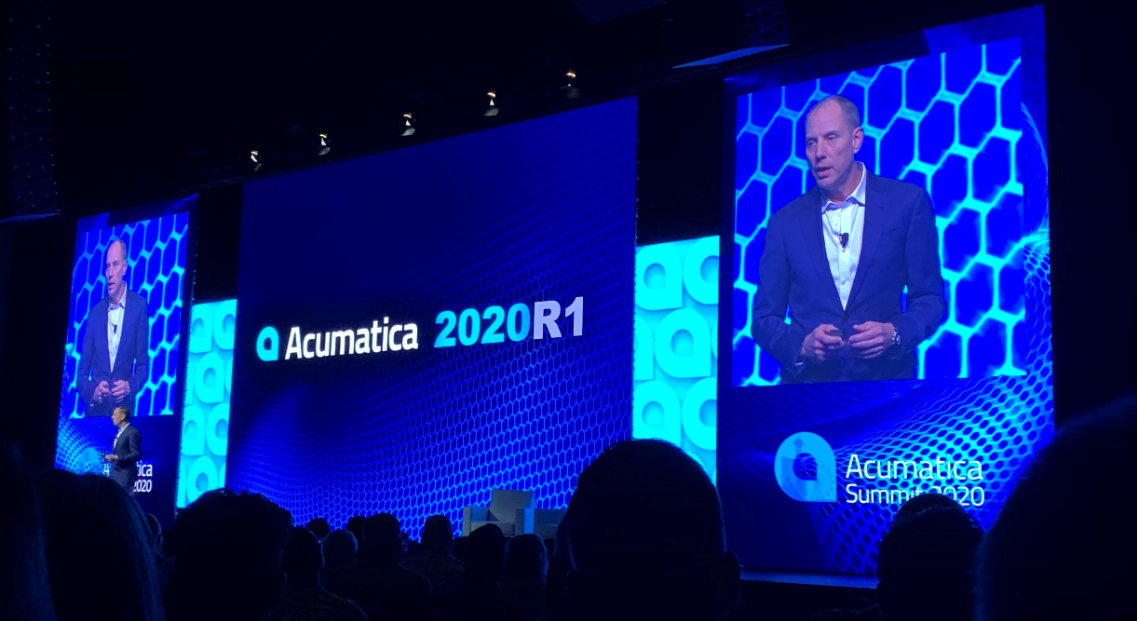
Acumatica released 2020 R1 in late March, revealed a multitude of new product features such as improvement in the usability, introduce power-packed new modules, best-in-class functionality, cross-connected processes, and codeless customisation. “2020 R1 is a significant product release,” said Jon Roskill, CEO, Acumatica. “We have to pause sometimes and marvel at the pace of innovation consistently delivered by our product team. Acumatica customers and partners keep clamouring for more and they get it, twice a year, with real quality.” Acumatica 2020 R1 put some light on the fact that the company is highly dedicated to developing new technologies into Acumatica product while focusing on superior user experience. The version is built on a future-centric platform with an open architecture for fast integrations, scalability, and ease of use, delivering unmatched value to small and medium-sized enterprises (SMEs). Exciting New Features in Acumatica 2020 R1 1. All-New Experience with Superior UsabilityUses Artificial Intelligence (AI) and machine learning to streamline user experience: Utilise mobile camera to make expense receipts quickly Give access to data entry screens fast with a quick add button New mobile capabilities: Record travel and break time while on service calls Enables to attach images directly to data records Ease of Reporting: Enhance performance with dashboard caching settings Give pivot table percentages calculations and individual counts 2. Eradicate Business Silos with Brand-New Native ModulesThe company understands the real complications of running a business on dissimilar systems. This is why, the experts strive to deliver robust, new native modules in 2020 R1 to allow running the whole business on one system. Take over markets with Omnichannel Commerce: Ecommerce powered business management through BigCommerce integration Allows users to automate B2B and B2C with omnichannel sales and implementation with unified back-end accounting Reduce overhead expenses and keep employees satisfied with in-house payroll: Decrease overhead expenses with Acumatica Payroll 3. Faster Growth with Best-in-Class FunctionalityIn 2020 R1, you will discover new features and enhancements in all industry editions. Acumatica ERP is designed for mid-market business expansion and offers best-in-class functionality by integrating core functions into a single business-wide software suite. Key Features for Distribution CompaniesIncrease sales and speed warehouse operations: Matrix inventory generates, tracks, and handle related products quickly. WMS involve wave and batch picking for faster implementation Key Features for Manufacturing CompaniesEnhance manufacturing operations: Monitor production and costs with native shop floor data collection Advanced planning features capable-to-promise and what-if situations Key Features for Construction CompaniesHandle more construction projects with enhanced project management tools: Streamlined project balance reconciliation Monitor project development with enhanced daily field reports including weather and photo logs Manage payments and retainage by lines in AR Key Features for International Companies International depreciation improvements support worldwide expansion 4. Tailored to your Business without Writing CodeUse online tools to create reports, alter workflows, add user-defined fields, and more without writing any code. Features include: Fast and easy data imports Modify tab orders and visibility Dynamically present field valid values Automate business workflows with a powerful, new workflow engine for CRM Add side panels to data screens to speed data entry 5. Boost Businesses with Cross-Connected WorkflowsWith the Acumatica cloud-based ERP solution, you can build end-to-end workflows, enhance productivity, and eventually strengthen your business. Features include: Enhanced lead qualification and contact management links sales with production Improved project billing based on field service activities How We Can Help?Following the recent announcements and capabilities of 2020 R1, at Netsense, we strive to explore emerging technologies and put all-in-one Acumatica ERP system to the front that ensures to drive operational efficiency and automation in your organisation. We assure you that our enterprise management solution will definitely transform the way you operate and help you thrive in a new digital world. If you’d like to discover Acumatica ERP capabilities on your own, schedule a demonstration with us today and make a smart decision to accomplish ultimate success. Don’t hesitate to contact us.
Our latest release, Acumatica 2019 R1, provides comprehensive product enhancements. Users will experience improvements to our financial management software, inventory management software, project accounting, and field service management software. Every application module of Acumatica’s cloud ERP solution has been enhanced in some way in Acumatica 2019 R1. Today, we’ll provide examples of the improvements in this new release, which were also presented at Acumatica Summit 2019 in Houston. For current customers and partners, the full set of Release Notes are available on the Acumatica Portal and a full recap of the Summit is posted. Improving application functionality and cross-connected workflows During Day Two of Acumatica Summit 2019, Acumatica CEO Jon Roskill said, “We love technology, but it’s not technology for technology’s sake. It’s technology and how we can apply it to very pragmatic problems in the real world.” This is apparent when you look at the improved functionality and cross-connected workflows that Acumatica 2019 R1 brings to the table. Below are some of these specific improvements broken down by module: Financial management Predefined list of currencies: Acumatica cloud ERP now provides a predefined list of all currencies included in the ISO 4217 standard. Financial management software users no longer need to manually enter the world currencies and their basic settings. Different Start Periods for Companies in the same tenant: Companies using Financial Management and having multiple legal entities within the same tenant can now have different fiscal year-end dates. With this functionality, an organization can accelerate implementation; simplify maintenance for companies that share vendors, stock items, and employees; run consolidated operational reports at any time; and facilitate the preparation of consolidated financial statements. Order management and Inventory Automated Warehouse Operations (WMS): Clients with medium or large warehouses typically use external inventory management software or WMS (warehouse management system) solutions for supporting standard warehouse operations with inventory items, such as picking, packaging, PO receiving, putting away, transferring, and physical counting by using barcode scanners (or mobile devices with a scanning option). Ship-to info: Multiple shipments or orders with different addresses are included in the Sales Order invoice. Project Accounting Multi-currency project accounting: Users can enter project transactions in different currencies and maintain projects in both the base currency and the project currency. With multi-currency project accounting, project managers and accountants can review actual revenues, actual costs, and committed costs in the project currency, with an ability to calculate project profitability in both the project currency and the base currency, and present costs to the customer in the customer’s currency. Project budget forecast by period: Enter and modify project budget forecasts and compare these forecasts with the actual project costs and incomes for each financial period. Users can forecast original and revised budget amounts and quantities for existing project budget lines for financial periods of the master calendar. Each project can have multiple budget forecast revisions. In a forecast revision, a user can distribute amounts and quantities of the project budget among the selected range of financial periods to speed data entry. By using forecast data, users can create generic inquiries and pivot tables. Company-Specific Financial Periods in Project Accounting: Companies using project accounting within the same tenant can have different fiscal year-end dates with this functionality. This is important for companies that share vendors, stock items, and employees. The company-specific periods are defined at the branch level. Field Services Calendar boards: With field service management software, customize the calendar board by rotating the members vs time axis. Users can change the time range to show schedules for one week or one month. The user now can also reassign an appointment from one staff member to another on a different date, viewing the agenda for a group of staff members on a particular week or month, or viewing the availability of rooms on a particular week or month. Location Tracking: Using mobile device of the service personnel, the GPS location of any location can be tracked. Generate Invoice: From the Field Service application, the service personnel can now directly generate an invoice from a service order or an appointment. Consistently improving platform usability Our applications continue to grow in functionality, are designed to transparently work together across module boundaries, and are easy to use because of our xRP platform. In every release, we improve the underlying system to improve our customers’ experience. Following are the enhancements Acumatica 2019 R1 brought to Acumatica’s cloud ERP platform. Custom color for User Interface: Ability to personalize the primary color of the company’s user interface. In addition, for multi-company or multi-branches, a different color can be specified for branch to make it easier for employees to distinguish these branches. Highlighting results in Inquiries: An option to highlight rows or columns of a generic inquiry based on conditions has been introduced. Base on the condition or formula, the system will highlight certain elements of a generic inquiry. For example, when inquiring on “opportunities”, the resulting grid can show those opportunities that have been won in green, those that have no owner can be yellow, and opportunities that are late can be red. Generic Inquiry Side Panel: The user can view the details of a row on the inquiry screen in the side panel. For sales orders, for instance, this could be the customer’s company information. Changes to the data can be made in the side panel and the information displayed can be data or dashboard graphics. In addition, fhe following improvements have been made to the side panel of generic inquiries: ability to resize the side panel and the new size saved automatically, a button has been added to maximize or minimize this panel, and side panel elements have been optimized to use window space more effectively. Improved help search via ML: In this release, Acumatica is using Machine Learning (ML) in the HELP text. Based on how effective the response to a natural language search has been, the system knows if it is serving up the correct results and adjusts. Link existing files to Acumatica entities: The ability to easily add links to the attachments that already exist in the system has been introduced. The user can add a link to the stored files right from the form
With the increasing demand for enterprise management solutions, it seems quite logical that you would own your ERP data. However, some companies are inclined towards cloud ERP vendors and in most cases, vendors own the data rather than you and your company. Isn’t it unfair? It is surprising to come across that your vendors’ SaaS End-User License Agreement (EULA) that provides you with the right to access their software doesn’t certainly give you ownership of your ERP data. Well, this is never a matter of concern with Acumatica ERP system. Users can simply take a data snapshot and save it in an imported database format, after all, it is their data. In this guide, we will discuss consequences that may fall if you don’t own your data and how Acumatica ERP ensures your complete data ownership from start to finish. Without further ado, let’s get started! What happens if You’re Lacking Data Ownership? Lack of PrivacyAs the data you store into your ERP system is obviously yours, it is easy to assume that you have ownership as well. But this is where you should carefully read the fine print because this isn’t the scenario, more often. A vendors’ End-User License Agreement (EULA) only gives the right to use their system but usually doesn’t offer data ownership. In fact, the case is just the opposite. Since the software vendor owns the data, they also have access to your data which they can use, read, and even harm the confidentiality of your private data. Difficult to Access Your DataFor instance, if you don’t own your data, it could become even more complicated to access it. This can adversely affect your company’s formation and decision-making process. A bigger challenge can occur if you decide to change vendors as they won’t let you go that easily. They can convince you to return your data even when it is an unusable format, inaccurate, temporarily ‘losing’ data, or hacked. How Acumatica ERP Gives Complete Data Ownership to Customers?Things in the case of data ownership work quite differently with Acumatica ERP. The company believes you should own what’s ethically yours. Using this system never means they have ownership of your data. Your data is owned by you and your company right from the beginning, written in Acumatica’s Bill of Rights. As we have discussed above, Acumatica ERP users can take a data snapshot and save it locally in an imported database format. This means you can have easy and quick access to your data and you don’t need to depend on vendors or someone else to attain access to the information you need. Another issue that needs to be addressed is your customers’ data. For instance, in the era of Artificial Intelligence (AI) and Machine Learning (ML), do you know who owns the right to your customers’ data? Well, some vendors might be gathering and using your combined data without your permission or knowledge for their own benefit. But again, it has never been a concern for Acumatica ERP users. Acumatica Cloud ERP System – Own Your Data, Access it Anywhere at AnytimeEvery organisation wants an easily customised and seamless solution that can be integrated with third-party applications and has data-analysis capabilities for the faster decision-making process. At Netsense, we offer the Acumatica ERP system that allows you to own and access your data anytime. You will be given complete ownership and power over your data right from the start. We understand that quick access to the company’s information is essential to make better-informed decisions and create a well-connected business. Feel free to reach out to us today to know more about the data ownership rights of Acumatica ERP customers and to schedule a free demonstration with our experts to see its superior usability and best-in-class functionality in action. We’d love to give you valuable assistance and support.

The current COVID-19 crisis has led to economic impacts, health risks, and social implications. While larger organisations have laid the operations to a remote workforce and moved to a cloud-based ERP system to expand wisely, this isn’t always the scenario for small businesses. Small and Medium-sized Enterprises (SMEs) are still perplexed about how to get their workforce back to work with the stable operating model to thrive. Recently, Acumatica announced an opportunity to gain a competitive edge with a new FastTrack Deployment solution that can Go Live in 90 days or less. By rapid ERP deployment timeline, you can experience productivity, high customer satisfaction, and lower cost of entry in minimum time. You might be asking yourself, ‘why would you speed up an ERP deployment?’ Or ‘wouldn’t this make the implementation more expensive and risky?’ To get started, we first want to clear your doubts to help you make a better-informed decision. How does FastTrack Deployment Work in Acumatica ERP?Traditional cloud ERP implementations start with the Discovery phase, which basically involves business needs, vision, and scope of the project. The next steps are Analyse, Build, Stabilise, with consistent Planning & Monitor. Every stage demands time and effort which varies depending on the difficulty of business’ needs, workflows, and processes. This isn’t rare or could be a problem for several organisations, thereby, FastTrack deployment is considered a viable choice. The Acumatica’s FastTrack Deployment follows an in-the-box (ITB) approach with the best practices-based templates and configuration checklists. It also utilises data migration tools to simplify data transmission. The framework is comprised of Initiation (Discovery and SOW), Adapt (Analyse, Design, Build, and Stabilise), and Deploy (Go Live and Post Go-Live). The final stage is Sustain, which consists of consistent improvement and receiving customers’ feedback. The pre-defined, core business deployment is available for General Business, Distribution, and Construction Editions at the present, which gets you into the Acumatica cloud ERP system within 90 days or less. It allows you to work within a structured timeline until you went live and accomplished what you’ve set yourself for throughout the implementation process. How Beneficial is Acumatica FastTrack Deployment for Your Organisation? Rapidly Achieve ProductivityIn-the-box (ITB) approach is a unique aspect about this solution as it enables us to roll out critical capabilities in incremental stages based on precise business needs. Since rollout is accomplished faster and directly connects to pressing needs, user adoption is swift and minimise the learning curve. Declined Cost to EntrySince FastTrack Deployment uses pre-configured content and a repetitive framework for faster achievements, you can get rid of the long traditional cloud ERP implementation process. Industry-Specific SolutionsThe best part about the FastTrack deployment solution is Vertical Editions, which are expanding to accommodate more industries very soon. The potential to harness that vast knowledge base provides this all-inclusive solution a more powerful punch. Increased Return on InvestmentWith pre-configured content and the option to begin with what you actually need while you scale and grow, businesses can take complete advantage of best-in-class features. The workforce will gain access to information and dashboard, from anywhere at any time which means spending less time in creating reports and spreadsheets and drive better ROI. How Netsense can Help You with Acumatica FastTrack Deployment?Go-Live in 90 days or less by leveraging methodologies and tools can keep you up and run smoothly and efficiently at low risk and cost. FastTrack involves pre-configured content that simplifies deployment while accelerating user adoption. Now you shouldn’t be concerned about stressful, time-consuming, and expensive ERP deployment. With Acumatica FastTrack Deployment, you can get started in the easiest way and save a lot of time and money. We offer an all-in-one Acumatica ERP solution which allows you to rapidly pivot your business and prosper. At Netsense, we can help you to accelerate your business with the automated process, timely data collection, financial analyses, and forecasting for insightful decision making. If you’re interested in discussing further how it can grow your business and would like to see a demonstration of Acumatica ERP, contact us today.

Does your cloud ERP vendor provide ERP deployment flexibility (e.g. allow you to deploy in a public cloud, like AWS or Azure, or a private one run by your own IT department) and let you switch when and…
Are you looking for technology that will place client information at your fingertips when you need it most? Field services technicians spend a lot of time serving customers in…

Staying connected and ensuring the safety of offsite employees isn’t new for contractors but doing so during a pandemic is. Acumatica’s COVID-19 Checklist for Contractors explains why and how Acumatica Construction Edition can help…